

How AI Model Routing Reduces Cost and Latency in Enterprise AI
TL;DR , Key Takeaways:
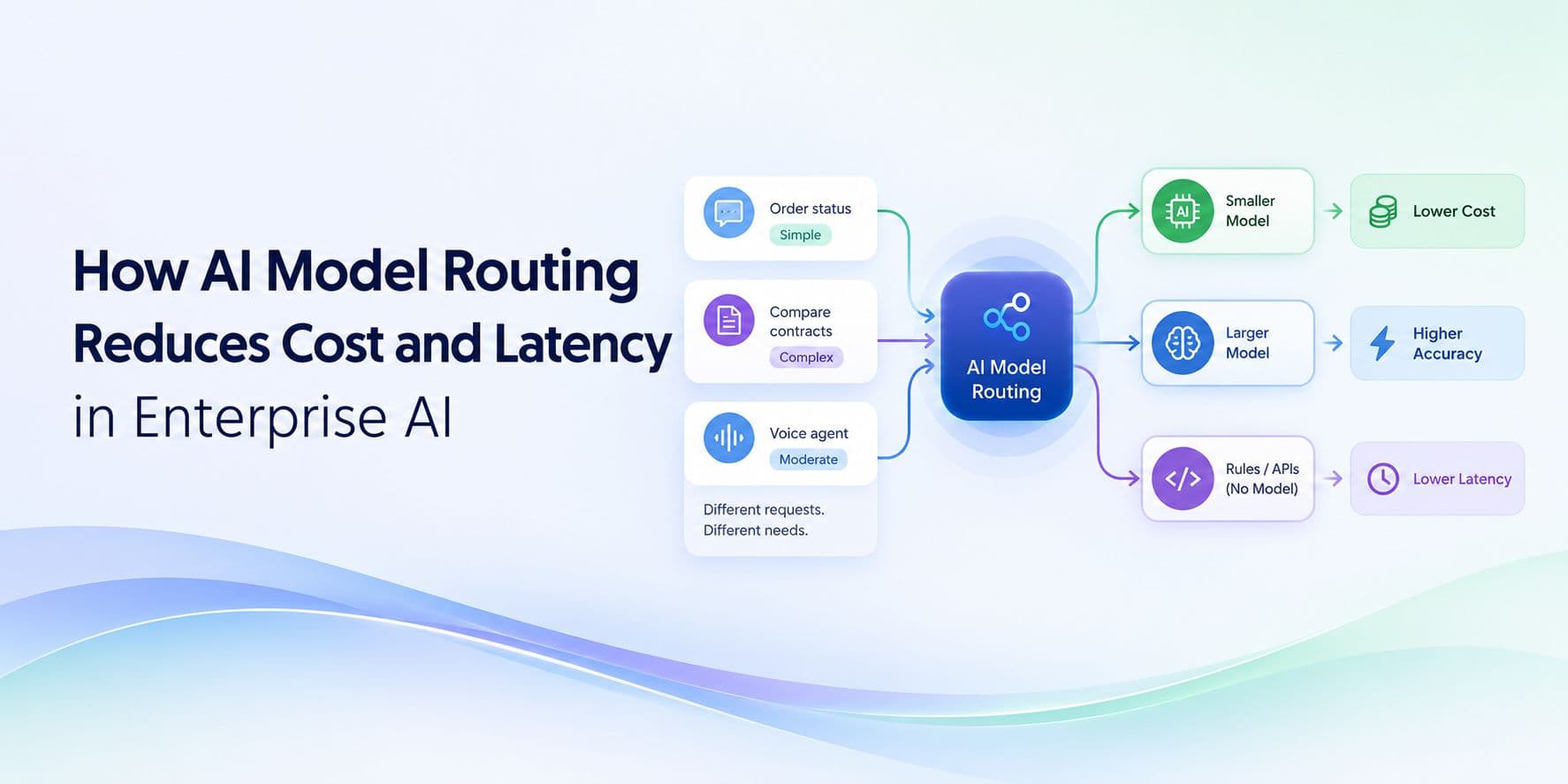
- AI model routing means choosing the appropriate model for each request instead of using one model for everything.
- Simple, repetitive tasks can often use smaller purpose-trained models.
- Complex reasoning can be routed to a larger model when the task actually requires it.
- Some workflows do not need a model at all and can be handled by business rules, APIs or application logic.
- Routing can reduce the amount of expensive model inference used across high-volume enterprise applications.
- It can also improve latency by keeping routine requests on a faster execution path.
- Knowledge graphs and retrieval can help the system understand what the request is about before choosing a model.
- A smaller model should only handle a task when it meets the required accuracy and reliability threshold.
- A strong architecture can use SLMs + larger LLMs + knowledge + business rules instead of forcing one model to do everything.
- The real goal is not simply lower model cost. It is lower cost per successful business task.
Not every AI request needs the same amount of intelligence.
A customer asking for an order status does not need the same model as an analyst comparing five contracts. A request to classify an intent does not need the same reasoning capability as a complex research task. A voice agent deciding whether a caller wants to make a payment does not necessarily need a large language model running behind every turn.
Yet many enterprise AI systems still follow a simple architecture:
Every request → the same large model → response
That can work for a prototype.
At enterprise scale, it can become an expensive way to run AI.
AI model routing offers another approach. Instead of using one model for everything, the system decides which model is appropriate for each request and sends the task to that model.
A simple task can stay with a smaller, faster model. A complex request can move to a more capable model. A deterministic workflow can bypass model inference entirely.
The result is a more flexible architecture that can reduce AI cost, latency and unnecessary infrastructure usage without forcing every enterprise workload onto the same model.
What is AI model routing?
AI model routing is a way of deciding which AI model should handle a particular request.
Instead of:
User → One LLM → Answer
the architecture becomes:
User → Understand the task → Choose the right model → Complete the task
The routing decision can consider things such as:
- What the user is asking
- How complex the request is
- How much context is required
- How accurate the response needs to be
- How quickly the response is needed
- Whether the task is high-risk
- Whether the request needs a specific deployment environment
- Whether the initial model is confident enough
The important shift is that model choice becomes part of the application architecture.
The enterprise is no longer locked into one model for every interaction.
Why use one model for every AI request?
Using one model everywhere is convenient.
There is one integration, one set of prompts and one model to monitor.
The problem is that enterprise workloads rarely have one level of difficulty.
Consider a customer-support system handling these requests:
“Where is my order?”
“How do I change my delivery address?”
“Why was my refund rejected?”
“Compare these two contracts and explain the risks.”
The four requests are not equally difficult.
The first might only require a lookup.
The second may need a structured workflow.
The third may require policy and account context.
The fourth may genuinely require deeper reasoning.
A single-model architecture treats every one of them as if they have the same requirements.
A routed architecture does not.
It asks:
What does this task actually need?
How model routing reduces AI costs
The clearest benefit is that expensive model capacity can be reserved for requests that actually need it.
Imagine an enterprise handles one million AI requests each month.
Suppose the workload roughly looks like:
- 70% routine tasks
- 20% moderately complex tasks
- 10% highly complex tasks
A single-model approach sends all one million requests to the same model.
A routed architecture could use:
Routine requests → smaller model
Moderate requests → specialised or mid-tier model
Complex requests → larger reasoning model
The exact percentages will differ by application, but the principle is the same:
The most expensive model should not be the default for every request simply because it can solve every request.
That is especially important for high-volume workloads such as customer support, document processing, classification, routing and voice interactions.
Smaller models are the foundation of useful routing
Routing becomes much more valuable when an enterprise has a purpose-trained SLM available for routine workloads.
Our Custom SLM architecture is designed around specific enterprise terminology, workflows and decision-making rather than trying to support every possible task.
A smaller model can handle jobs such as:
- Intent classification
- Customer request routing
- Entity extraction
- Structured output
- Workflow-state detection
- Domain terminology
- Known policy matching
- High-volume classification
These tasks matter to the business, but they often have a clearly defined output.
They do not necessarily require the broad reasoning capability of a large general-purpose LLM.
Our published Custom SLM benchmarks report 10× smaller models and 3× faster inference for evaluated workloads, along with significantly higher inference density and lower inference cost for the benchmarked workload.
The important principle is not simply that smaller models are cheaper.
It is:
A specialised model can be a better fit for a specialised task.
When should a request go to a larger LLM?
The purpose of routing is not to avoid large models.
Large models are useful when the problem genuinely requires broader reasoning.
Examples include:
- Complex multi-document analysis
- Open-ended research
- Unfamiliar problems
- Detailed synthesis
- Ambiguous instructions
- Long-form reasoning
- Advanced planning
- Complex agent workflows
A useful enterprise architecture therefore has an escalation path.
It might look like:
Request → Small model → Validate → Complete
Or:
Request → Small model → Not confident enough → Larger model → Complete
This is much more practical than deciding in advance that every request needs the largest model.
Start small, escalate when needed
One of the most useful routing patterns is:
Start with the fastest appropriate model and escalate only when the task requires more capability.
For example, a customer says:
“My payment is pending.”
A purpose-trained SLM can identify the intent.
The system can then: retrieve the account, check the payment status, apply the relevant workflow and respond.
Now the same customer says:
“This has happened three times across two accounts. Compare the transactions and explain why the behaviour changed and whether I should switch plans.”
That is a different problem.
The system can escalate the request because it requires broader reasoning across multiple pieces of information.
The model architecture adapts to the problem instead of forcing every interaction through the same path.
Model routing can reduce latency too
Cost is only part of the story.
Smaller models can also provide a faster path for routine requests.
If thousands of simple requests are being sent to a large model, those requests may consume resources that are unnecessary for the task.
Routing them to smaller models can help reduce: inference time, queueing, memory pressure, resource contention and overall response time.
This matters especially in applications where users expect an immediate response.
Our AI latency architecture guide covers the broader factors that influence enterprise response time, including model inference, retrieval, APIs, context and orchestration.
The important point here is:
A faster model is useful only when the rest of the workflow does not add unnecessary delay.
Routing can reduce token consumption
Routing is also connected to the amount of information the system processes.
A large model may receive:
- system instructions
- long conversation history
- retrieved documents
- tool results
- business context
for every request.
A specialised model may only need:
the current request
a small amount of context
a structured workflow
The architecture therefore avoids sending large amounts of context to a model that does not need it.
Our article on reducing AI token usage covers this broader relationship between context, token consumption and enterprise AI cost.
The principle is simple:
Do not send expensive intelligence and large context to a task that does not need either.
Knowledge graphs can help decide where a request should go
Routing becomes more effective when the system understands what the request is actually about.
This is where a knowledge graph can become useful.
Consider:
“Can this customer change the repayment date on this account?”
The system may need to identify:
Customer
→ Account
→ Product
→ Region
→ Applicable policy
→ Workflow
Once that context is clear, the system can determine the appropriate path.
It might send the request to: a specialised SLM, a policy retrieval workflow, a business-rules engine or a larger reasoning model.
Our platform uses knowledge graphs to structure enterprise relationships around areas such as products, regulations, SOPs and workflows, creating context that can be used by the broader intelligence layer.
Model routing is not the same as random model selection
A good routing system is not:
“Send half the requests to Model A and half to Model B.”
The decision should be based on the workload.
Useful signals include:
Task type
Is this classification, extraction, retrieval, generation or reasoning?
Complexity
Does the request require a simple decision or several reasoning steps?
Context
How much information needs to be considered?
Accuracy requirement
Does a mistake have a minor impact or a significant business impact?
Latency requirement
Does the user need an immediate response?
Risk
Should a higher-capability model or human review be involved?
Data sensitivity
Does the request need to remain inside a private deployment?
Confidence
Did the first model produce an answer that meets the required quality bar?
This makes routing a business decision as much as a technical one.
Some tasks should bypass AI entirely
A useful model-routing architecture also asks:
Does this task need a language model at all?
Consider a rule:
Refunds above ₹50,000 require manager approval.
The AI does not need to reason about that rule every time.
The business system can simply evaluate it.
Similarly:
Customer balance → database
Appointment availability → scheduling API
Eligibility threshold → business rules
Account identity → authentication system
Policy document → knowledge system
The model can interpret the user’s language and orchestrate the workflow, while deterministic systems handle what they are better suited to handle.
This can reduce both AI usage and unnecessary uncertainty.
Model routing works especially well for high-volume enterprise tasks
Routing becomes more valuable as request volume increases.
Consider a customer-support system handling:
100 interactions
versus:
10 million interactions
At low volume, the simplicity of using one model everywhere might outweigh the benefits of routing.
At high volume, the economics change.
Even modest savings per task can become meaningful when multiplied across millions of requests.
This is why model routing can be particularly useful for:
- Contact centres
- BFSI workflows
- Document processing
- E-commerce support
- Employee assistants
- Claims processing
- Healthcare administration
- Telecom support
- Enterprise search
Our industry AI solutions are designed around these kinds of enterprise workflows where the same AI capability may be used repeatedly at scale.
Model routing for voice AI
Voice AI is one of the clearest examples of why not every request needs the same model.
A caller might say:
“What time do you close?”
That may be a simple retrieval task.
Another might say:
“My payment failed twice, the account still shows pending, and I need to know whether this will affect my next billing cycle.”
That requires significantly more context and reasoning.
A routing layer can keep the simple interaction on a fast path while escalating the complex one.
Our enterprise voice agent architecture combines speech recognition, knowledge grounding, decision-making and speech generation, with the platform currently reporting less than 1.5 seconds end-to-end voice-to-voice response.
For voice applications, routing can help protect the fast path while still allowing more capable reasoning when a conversation requires it.
Model routing can improve infrastructure efficiency
The infrastructure needed to run a large model can be very different from that required for a smaller model.
A routed system can therefore distribute traffic across models with different requirements.
For example:
Small SLM → high-volume routine requests
Larger model → complex requests
Edge model → local requests
Business rules → deterministic workflows
That can improve:
GPU utilisation
concurrency
capacity planning
latency
and inference cost.
Instead of sizing every part of the application around the most demanding model, the architecture can allocate resources according to actual workload.
What if the smaller model gets it wrong?
This is one of the most important questions in model routing.
The answer should not be:
“We hope the smaller model gets it right.”
The architecture needs an evaluation and escalation mechanism.
A simple pattern is:
Small model
↓
Check result
↓
Meets quality threshold?
Yes → complete
No → escalate
The validation can come from:
- confidence scoring
- structured output validation
- business rules
- knowledge checks
- API confirmation
- or human review.
The smaller model is not being trusted blindly.
It is being used as the first and most efficient path.
Model routing should be evaluated on more than cost
A routing system can lower cost while making the application worse.
For example:
Lower cost
but:
lower accuracy
higher escalation
more retries
slower complex tasks
That is not a successful optimisation.
The right metrics include:
- Accuracy
- Cost per task
- Latency
- P95/P99 response time
- Escalation rate
- Retry rate
- Throughput
- Model utilisation
- Task completion
- User satisfaction
The most important principle is:
A cheaper model is only better when it still meets the requirements of the workload.
How to build an enterprise model-routing strategy
A practical approach is to build routing in stages.
1. Start with the real workload
Collect the actual requests your system receives.
Do not design routing around hypothetical prompts.
2. Group requests by difficulty
For example:
Simple
Structured
Complex
High-risk
3. Define the quality threshold
What accuracy does each category require?
4. Benchmark candidate models
Measure:
accuracy
latency
cost
memory
throughput
5. Start with the smallest suitable model
Use the simplest architecture that meets the quality requirement.
6. Add an escalation path
Define when the request should move to a more capable model.
7. Monitor the routing distribution
See how many requests are actually reaching each model.
8. Keep improving the routing policy
As workloads and models change, the routing strategy should change too.
This is also why our AI benchmarks are important. Model choice should ultimately be based on measurable performance, not simply model size or marketing claims.
What model routing looks like in practice
A practical enterprise architecture might look like:
User
↓
Task understanding
↓
Knowledge / context
↓
Model routing
→ Custom SLM
→ Larger reasoning model
→ Edge model
→ Business rules / API
↓
Validation
↓
Response or action
This architecture does not assume that one model should perform every task.
It assigns the work to the component that is best suited to it.
That can create a much more efficient system than:
User → giant prompt → large LLM → everything
Where our Custom SLMs fit
The value of model routing becomes particularly clear when an enterprise has access to purpose-trained models.
Our Custom SLMs are designed around enterprise language, terminology and workflows, giving the architecture a specialised model tier for tasks that do not require a broad general-purpose LLM.
That makes a model hierarchy possible:
Small specialised model → routine enterprise tasks
Larger model → complex reasoning
Knowledge graph → relationships
RAG → supporting evidence
Business rules → deterministic decisions
APIs → live business state
Instead of asking one model to do all of these jobs, the architecture gives each component a defined role.
Model routing is also useful when deployments are different
Not every AI request needs to run in the same environment.
For example:
Edge model → device
Custom SLM → private infrastructure
Larger model → cloud
Sensitive workflow → on-premises
This creates another dimension of routing:
Not only which model, but where should that model run?
Our enterprise AI platform supports cloud, private VPC, on-premises and air-gapped deployment, while our on-device models support local CPU-based inference.
This can be particularly useful for organisations with different privacy, latency and infrastructure requirements across different workflows.
The future of enterprise AI is not one model
As enterprise AI becomes more deeply integrated into business operations, the idea of one model doing everything becomes less practical.
A mature system may use:
- small models for simple tasks
- larger models for complex reasoning
- knowledge graphs for enterprise relationships
- retrieval for current information
- rules for deterministic decisions
- edge models for local processing
- and human escalation where required.
This is not unnecessary complexity.
It is specialisation.
The same reason companies do not use one software system for every business function applies to AI.
The goal is to give each part of the workflow the capability it actually needs.
Final thoughts
AI model routing is ultimately about one question:
Does every request really need the same amount of intelligence?
In most enterprise applications, the answer is no.
Some requests are simple.
Some are structured.
Some are complex.
Some are deterministic.
Some are high-risk.
Some need to run locally.
Once that becomes clear, the model architecture becomes much more flexible.
A customer-support classifier can stay on a fast SLM.
A complex contract analysis can move to a larger reasoning model.
A policy question can use the knowledge layer.
A workflow condition can use business rules.
An offline device can use an edge model.
The result is an AI system that is not just more capable.
It can also be more efficient, faster and easier to operate at scale.
The objective is not to avoid large models.
It is to avoid using a large model when a smaller and more specialised system can do the job just as reliably.
That is the real value of model routing in enterprise AI.
Frequently Asked Questions
What is AI model routing?
AI model routing is the process of choosing the appropriate AI model for each request or task rather than sending every request to the same model.
How does model routing reduce AI costs?
It can reduce cost by sending simple, high-volume requests to smaller models while reserving larger and more expensive models for tasks that actually require their additional capabilities.
How does model routing reduce latency?
Smaller models can provide a faster path for routine tasks. Routing can keep simple requests away from slower or more resource-intensive models, which can improve response time and reduce resource contention.
Do all enterprise AI tasks need an LLM?
No. Some tasks are better handled by small specialised models, APIs, databases or deterministic business rules.
What can a Custom SLM handle?
A Custom SLM can be designed for tasks such as intent detection, classification, routing, extraction, domain terminology and repetitive enterprise workflows.
When should a request go to a large LLM?
A larger model is more appropriate when the request requires broad reasoning, complex synthesis, open-ended analysis, unfamiliar problems or sophisticated multi-step reasoning.
Can model routing reduce token consumption?
Yes. Smaller specialised models can handle tasks using less model capacity, while complex tasks can receive richer context only when necessary. Routing can therefore reduce unnecessary use of large-model inference.
Can knowledge graphs help with model routing?
Yes. A knowledge graph can provide structured context about customers, products, policies, regions and workflows, helping the system understand what a request involves before choosing the appropriate path.
Can model routing work for voice AI?
Yes. Voice interactions can be routed based on complexity, workflow or intent. Simple requests can stay on a low-latency path, while complex conversations can be escalated to more capable reasoning.
How should enterprises measure model routing?
Measure accuracy, cost per task, latency, throughput, escalation rate, retries, task completion and infrastructure utilisation. A routing system should be evaluated on the actual workload it will serve.
Is model routing always better than using one model?
Not necessarily. A simple application may not need routing. Routing becomes more valuable when an application has multiple task types, significant request volume or large differences in model complexity and cost.
SEO Metadata
SEO Title: How AI Model Routing Reduces Cost and Latency in Enterprise AI
Meta Description: Learn how AI model routing helps enterprises reduce cost and latency by sending simple tasks to smaller models and complex requests to more capable AI models.
Suggested URL: /blog/ai-model-routing-enterprise-cost-latency
Primary Keyword: AI model routing
Secondary Keywords: enterprise AI model routing, model routing, LLM routing, AI model selection, reduce AI costs, reduce LLM latency, SLM routing, enterprise AI architecture, model selection for AI, AI inference optimisation, model routing strategy, custom SLMs, enterprise AI cost optimization

Bio: Navvya works at the intersection of product strategy and applied AI research at Shunya Labs. With a background in human behaviour and communication, she writes about the people, markets, and technology behind voice AI, with a particular focus on how speech interfaces are reshaping access across emerging markets.